Introduction
In the dynamic realm of SEO, where the spotlight often shines on high-profile tactics like backlinking strategies and keyword optimization, there lies a foundational yet frequently overlooked hero: internal linking. This silent workhorse of website navigation and optimization quietly underpins the user experience, guiding visitors through a website’s depths easily and precisely. Internal linking is not just about creating a web of connections; it’s about constructing a labyrinth that is both intuitive and informative, ensuring that both users and search engines can navigate your site’s content seamlessly.
Despite its critical role in enhancing SEO and improving site navigability, internal linking often finds itself overshadowed by more glamorous, attention-grabbing strategies. Yet, it remains an indispensable element of a well-optimized website, serving as the backbone that supports a myriad of SEO functions—from distributing page authority across your domain to reducing bounce rates by encouraging users to explore further. As we delve into the lost art of internal linking, we uncover the nuances of this essential technique, reminding ourselves of its value in crafting a cohesive, user-friendly, and search engine-friendly website.
The Importance of Internal Linking
The strategic implementation of internal linking transcends basic website connectivity; it wields the power to significantly amplify a site’s SEO effectiveness. By judiciously mapping out internal links, a website effectively distributes page authority—also known as link equity—throughout its pages, thereby enhancing the visibility and ranking potential of individual pages in search engine results. This internal web of links enables search engines to crawl and index a site more thoroughly. It’s akin to laying out a welcome mat for search engines, guiding them through your site’s pages and signaling which pages hold the most importance. Moreover, by incorporating relevant keywords into the anchor text of internal links, a site can further bolster its SEO, as these descriptive cues help search engines understand the context and content of linked pages, aligning them more closely with user queries.
Beyond the realm of SEO, internal linking plays a pivotal role in sculpting the user experience. A well-thought-out internal linking strategy transforms a website into a navigable landscape, making it effortless for visitors to journey through related content and discover the information they seek. This ease of navigation not only satisfies immediate informational needs but also helps encourages visitors to spend more time exploring the site. As a direct consequence, websites can see a significant reduction in bounce rates.
When users encounter relevant and compelling links that promise further value, they are more likely to follow these pathways, delving deeper into the site. This not only increases their time spent but also builds a foundation for a more engaged and informed audience. Thus, pointing pages to other pages on your site emerges not just as a technical SEO tactic but as a cornerstone of creating a positive and seamless user experience.
Best Practices for Internal Linking
Adhering to certain best practices is crucial to harnessing the full potential of internal linking.
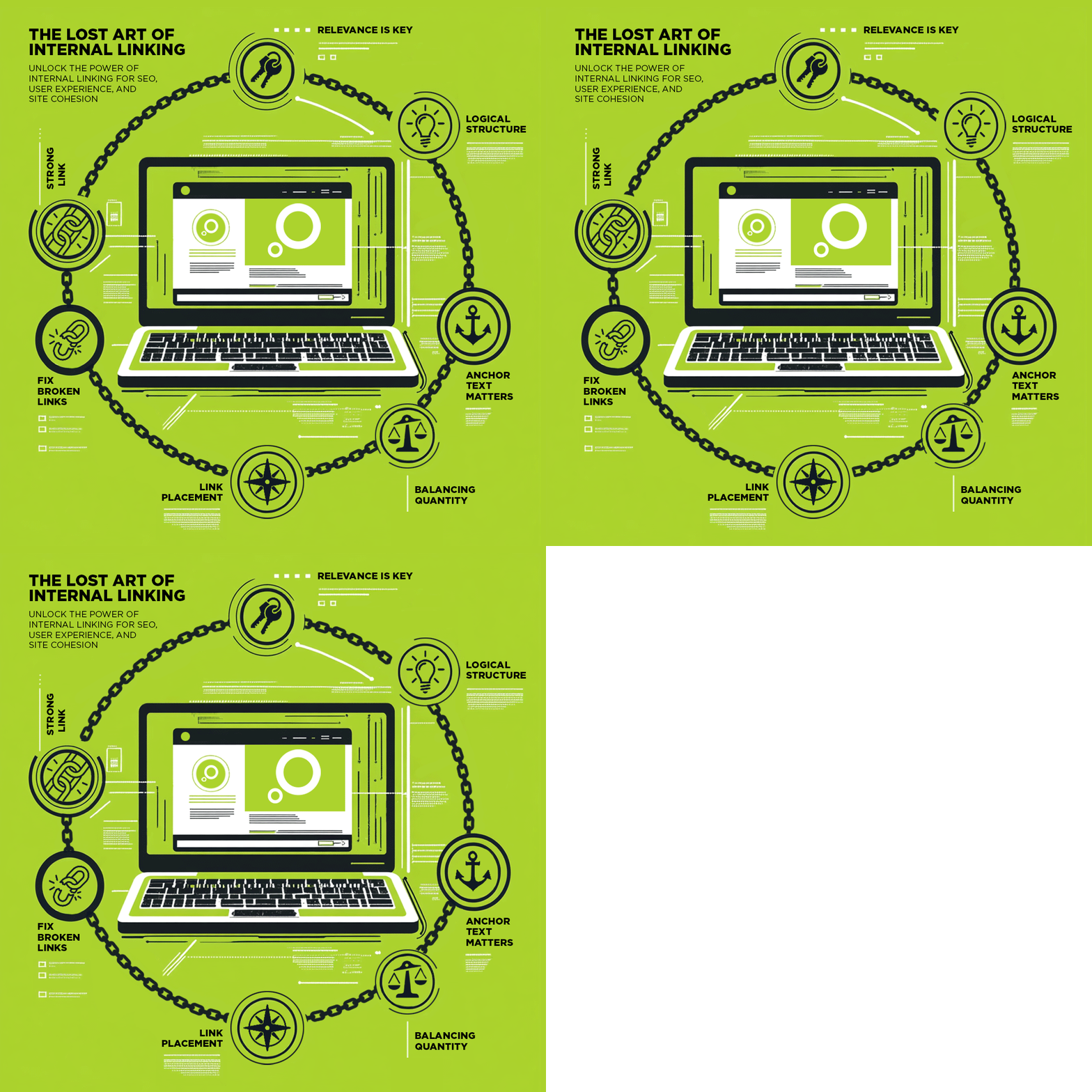
Relevance is Key
Ensure every internal link connects to content that adds value and relevance to the original page, enhancing the user’s journey and aiding search engine context.
Anchor Text Matters
Use descriptive and specific anchor text to provide clear expectations about the linked content, making it obvious what content the visitor will see next.
Link Placement
Integrate links naturally within content where they are most contextually relevant and likely to be clicked without disrupting the user experience.
Balancing Quantity
Find a balance in the number of internal links to avoid overwhelming users and diluting page authority, focusing on quality over quantity.
Using a Logical Structure
Organize content in a clear, topic-based hierarchy to support efficient internal linking and easy navigation, boosting SEO and user engagement.
Internal Linking Pro Tip
An advanced tactic that leverages the full potential of internal linking involves the creation of content hubs or silos. This approach organizes your website’s content into distinct themes or topics, effectively grouping related articles, blogs, and resources together. By structuring your site in this manner, you not only make it easier for users to find content that interests them but also signal to search engines the depth of your expertise in specific areas.
Each hub or silo acts as a focal point, concentrating page authority around a particular topic and thereby enhancing your site’s authority and relevance in search engine rankings for those subjects. This strategic organization not only improves the navigability of your site but also strengthens its thematic signal to search engines, boosting your visibility for targeted keywords and topics and increasing your chances of showing up in search results.
3 Common Mistakes to Avoid
Over-optimization
Beware of the temptation to use keyword-rich anchor text for your internal links excessively. While it’s essential to use descriptive and relevant anchor text, over-optimizing with too many keywords can appear manipulative to search engines. This practice can trigger search engine algorithms to penalize your site, believing you’re attempting to game the system. Aim for a natural distribution of anchor texts that genuinely assist users and reflect the linked content’s nature.
Neglecting No-Follow Links
No-follow tags tell search engines to ignore a link in terms of passing on link equity. While most internal links should allow link equity to flow freely, there are scenarios where no-follow tags are appropriate, such as links to login pages or sections of a site you don’t want to rank. Misusing no-follow tags on internal links can lead to a suboptimal distribution of page authority across your site, weakening your SEO efforts. Understand when and where to apply these tags to maintain a healthy link equity distribution.
Fixing Broken Links
Regularly auditing your website for broken internal links is vital for maintaining both link equity and a positive user experience. Broken links lead nowhere, frustrating users and causing search engines to view your site as poorly maintained. This can negatively impact your site’s SEO performance and credibility. Utilizing tools to monitor and fix broken links ensures that your internal linking structure remains robust, supporting smooth navigation for users and efficient crawling by search engines.
Conclusion
In wrapping up our journey through the intricacies of internal linking, it’s evident that this technique is far more than just a technical SEO requirement—it’s a critical component for enhancing user experience and improving website navigation. Through deliberate application of best practices, like ensuring content relevance, optimizing anchor text, and maintaining a logical structure, websites can significantly improve both their search engine rankings and user engagement. Avoiding pitfalls such as over-optimization, neglecting no-follow tags, and overlooking broken links is equally important to preserve the integrity and effectiveness of your internal linking strategy.
Remember, the power of internal linking lies in its ability to seamlessly guide users through your site’s content, encouraging deeper engagement while simultaneously signaling to search engines the richness and depth of your content offerings. Embracing this lost art can transform your site into a well-oiled machine, ready to captivate users and satisfy search engine algorithms alike. Let’s not underestimate the value of well-crafted internal links; they are the silent champions of SEO and user satisfaction, capable of elevating your digital presence to new heights.
If you need help auditing your internal link structure, contact Planit today.
Where does an internal link go when clicked?
An internal link takes users to another page on the same website. It helps visitors navigate related content and signals page relationships to search engines.
How to do an internal link?
You create an internal link by highlighting text and linking it to another URL within your site. Most CMS platforms let you insert a link by selecting a page from your internal link menu.
What is an example of an internal link?
An internal link might point from your homepage to a services page or from a blog post to a related article. Any link that keeps users within your own domain qualifies.
How to fix broken internal links?
You fix broken internal links by identifying pages that return errors, updating them to the correct URLs or redirecting outdated links to relevant new pages. Tools like crawlers or Search Console can help locate issues.