“This email is going to perform SO well!”
And send….…crickets.
We’ve all confidently thought this and excitedly pressed send just for an email campaign to completely fall flat. Sometimes it just doesn’t hit the inbox at the right time or that subject line gets lost in the sea of endless emails. Maybe your list didn’t feel influenced by the CTA. Whatever the reason, everyone in the email marketing world has been there, and we’ve all spun our wheels trying to figure out what went wrong.
Simple steps to make big changes to your email campaigns
But where do you start? Now every email, list, and strategy will be different based on the products, services, or mission of your brand or organization, but this quick reference guide can be applied to make emails connect with audiences more. Through our experience and research, we’ve boiled down the tactics and identified high-impact strategies you can start using right away.
What are the three core pillars of a smarter email program?
The answer isn’t just to add more emails – it’s to make them smarter. By focusing on just three key areas:
- Topicality
- Personalization
- Simple automations
We’ll break down the power of topicality (the right message at the right time), the magic of personalization (making it feel like it’s just for them), and the time-saving genius of simple automations (because robots are here anyways; might as well use ‘em). One of the best parts is that these tips can be applied to any program from B2C and B2B businesses looking to increase ecommerce sales or drive customers into brick-and-mortar stores to nonprofits trying to level up their fundraising strategies.
Let’s press send on this strategy, and take a look at topicality.
1. Topicality – Don’t Just Send to Send. It Doesn’t Work.
I have had a window into countless email programs, and one of my biggest pet peeves is sending just to check a box without regard to if the content will resonate with your list.
Don’t Just Send to Send. It Doesn’t Work.
Don’t get me wrong, sometimes you have to tell consumers or supporters what’s important right now, whether it’s for a flash sale or Giving Season. The key difference is that these moments should ultimately benefit the consumer or supporter. With a flash sale, they save money. With a matching gift, their contribution goes even further.
To make sure you’re including topicality in your existing process: when concepting every email, ask yourself, “How does the consumer/supporter receive a perceived benefit from this?”. If you can’t find a perceived benefit, it might be wise to scrap the idea or reframe it to better benefit the person receiving the message.
Sometimes, yes, you have to send an email to update your list on something for your business, campaign, or organization that might not have a perceived benefit, but that doesn’t mean you have to send something boring or lacking engagement. You probably have the freedom to adjust the concept to center the person receiving the message as much as possible.
The Big Picture
When creating your email marketing program’s calendar, it’s important to think about the big picture. It’s rather easy to look at only a few emails and not consider what has been deployed recently or what will need to be deployed in the near future. You’ll want to be sure topics don’t become overused or sent too frequently.
Here are two ways to consider your big picture:
Review your overall calendar and use your best judgment. Do topics clash with one another? Would a reasonable person get bored or overlook content because it is too similar to something else sent recently?
- To strengthen your analysis, review your program’s email results and see if any specific topics or email hooks have either consistently performed poorly (a possible sign to pull back on that topic or reframe how it’s portrayed) or performed well (a sign you may want to focus more on this topic).
2. [[FirstName]], seriously, you should start personalizing.
Personalization is a powerful tactic that can be relatively easily added to your email program. Does it require some focus on data hygiene? Yes, it certainly does. You want to make sure the data in your CRM is mapped correctly and you have some standardization to how things get input.
As long as you’ve got some of the most basic of things being captured at signup (first name, last name, email, zip, state, etc), then you can start adding these small touches that catch the eye to your email cadence.
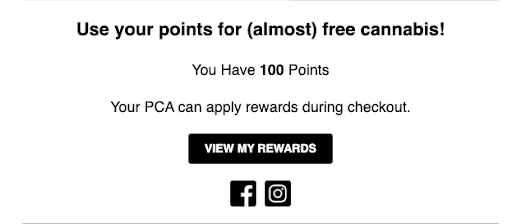
You can use personalization to let your customers know loyalty points status
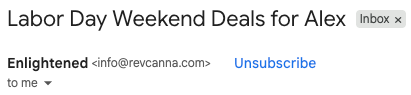
You can make your subject line standout by including their first name.
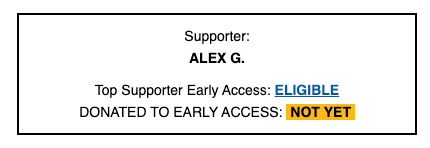
You can create a supporter or customer record to indicate if they haven’t taken advantage of a match, campaign, or sale opportunity.
What can you do with personalization?
- Add a first name to a subject line to increase opens.
- Use the first name in the salutation to make the reader feel it’s more one-on-one.
- Throw in a state or zip code to make your message more location-specific.
- Add their email to the end of a link to give them a “personalized link.”
- And so much more.
No matter what you do, you’ll want to test the impacts of the mergefield (the link to the data source that pulls in the information from your list) use.
A/B Testing in a Nutshell
For those with small lists: You may have trouble hitting statistical significance (the mathematical determination on how reliable your findings are) on an A/B test (testing one variant against another; usually “control” versus “test”), but that doesn’t mean your data isn’t helpful at all. You can run the test a few times and aggregate it to see if that gets you closer to statistical significance or use the learnings directionally. By that, I mean, that you can test it a few times and if the winner is consistent, then you can feel more confident in declaring a winner.
For those like me with less than perfect mathematical skills, I’d recommend Googling “A/B test significance calculator.” If you hit above 90% confidence levels, then you should feel confident in your results (95% confidence is too high of a bar that’d rarely get hit in my opinion for email marketing and won’t be beneficial for testing). If you hit between 70% and 90% multiple times, then I’d say that’s a directional win and you can implement the winning tactic. Anything below 70% gets to be less reliable and judgement calls may need to be made (need help with this? We’re happy to walk you through it, contact us here).
Use Fallbacks for Personal Data You Don’t Have
It’ll be nearly impossible to have a first name or zip or whichever field you’re planning to use filled in and complete for every. single. subscriber. So you 100% should include a fallback in the email code. You could make it “friend” or use logic to make it blank so an extra space isn’t leftover or if it works, using “your.” The options are only limited by your imagination for fallbacks so don’t be afraid to test out new things.
Hot tip: Include an “Update your Account” link in the footer
If your CRM has the ability, it’s a nice touch to add a link to your email footer to update their account or subscription preferences. This gives them the ability to update their name or other information and minimizes emails making this request or calls to your front desk with the same questions.
3. The big bad automations…they’re not that scary, I promise!
Let’s start here: Automations can run the gamut of difficulty to set up, but they can be critical in being a conversion-driven program. Using the Klaviyo 2025 Benchmark Report, two simple flows can increase your revenue per recipient (RPR) (Ready to go beyond these two flows, check out Omnisend’s complete guide on email automations).
Which easy email marketing automations make a dent?
The Klaviyo report shows an abandoned cart flow (or apply this to nonprofits and it’d be an abandoned donation flow) can garner a $3.07 RPR, the highest amongst their analyzed flows. The next major flow is a welcome flow, which clocked a $2.35 RPR.
Let’s recover those abandoned carts and win back loyalty.
For abandoned cart, it’s more important to have something than nothing at all. If you can’t capture what the reader was looking at or intending to buy or donate, then just a generic reminder email with the personalization you do have capabilities for will suffice and make a strong impact. If you can get the product they abandoned into the flow, that’s even better. The email can be rather short and sweet but include some value-add language to encourage that conversion.
Welcome one and all to our email universe!
Welcome series should contain information about your business or organization and welcome them to your team, family, or list. I’d recommend sticking to 1 or 2 emails over the course of 3-4 days. The first email can outline who you are and how to stay connected (maybe a cross-promotion to follow on social media). Then the second message can include a call to action to start shopping or take a survey, but it is critical that it contains a different CTA than the first email and contains something that benefits the reader (incentive to shop or something to kickoff their shopping experience or asking for them to share their opinion via a survey). If you’re able, keeping readers out of regular stream emails while they go through the welcome will offer a better journey for your consumers or supporters.
Well, that’s it! Now you’ve got the tools.
That’s all, folks! If you’re looking to add some spice to your program and inject some good vibes into your metrics, these three tips are a great place to start.
But if you’re ready to invigorate your email program beyond this and want experts to analyze your strategy, we’re here to help. From program inception to building on what you’ve already done, Planit is here to make your vision a reality. Contact our digital marketing agency here to get started.