
Key Takeaways
- What are Gmail Annotations? They are free, highly visual enhancements (like image carousels and deal badges) that appear directly in a user’s Gmail Promotions tab.
- Why it matters: Gmail dominates inbox market share. Annotations give you a massive opportunity to bypass the noise of standard text and grab attention before an email is even opened.
- You are in control: You no longer have to rely on Google’s unpredictable “auto-extraction.” You can use simple code (like Microdata) to dictate exactly what users see and when deals expire.
- The 4 Types: You can leverage Product Carousels, Single Image Previews, Deal Annotations (pre-open), and Deal Cards (post-open).
- The First-Mover Advantage: Because manual control is so new, testing annotations now gives your brand a massive visual edge over competitors who are still stuck in the text-only dark ages.
Every email marketer is haunted by the same questions every day: “Did I end up in spam? Am I in deliverability hell? Is it even an open or was that a bot? Is my DMARC set up right? Do I need BIMI?”

Within the last decade, the number of KPIs to monitor for successful delivery and attention-catching emails has become exponentially more convoluted. What’s even crazier is some tactics have become so desperate for an open that their subject lines are spurring multiple class-action lawsuits. And all of this is before we even get someone to open the email.
So yes, my fellow brand builders, It’s time to move past the ‘black box’ of the Promo Tab. Here is your foundation for using Annotations to boost engagement, bypass the noise, and take back control of the inbox together! (Together?!?! Yes! Wouldn’t that be fun?!?! Shoot me an email at [email protected] so we can chat about it. No, seriously, I’ll read every email I get).
What are Gmail Annotations?
According to Google for Developers,
“Email annotations bring email messages in the Promotions tab to life with features such as images, deals, and expiration dates. When you annotate emails, Gmail users view and interact with your promotions directly from their inbox.”
When you boil it down, annotations are just an additional aspect that you can add to two specific areas of Gmail: 1) Annotations directly in the envelope (where the Sender, Subject Line, Preview Text go) of the Promo Tab Inbox or 2) As a “card” directly above the email once opened.
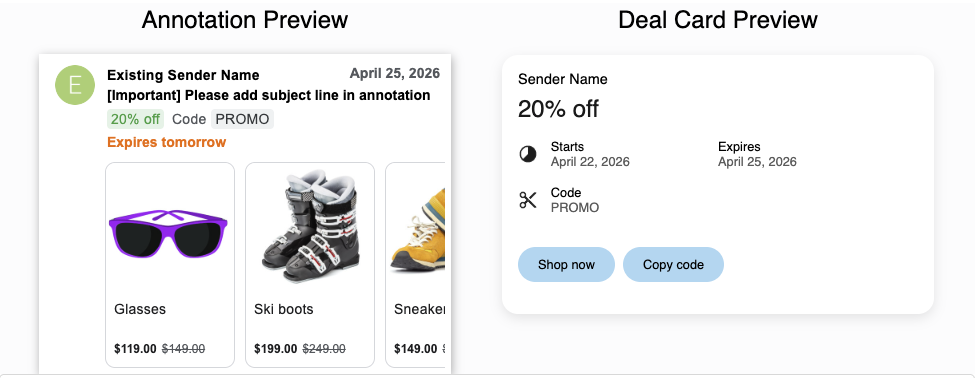
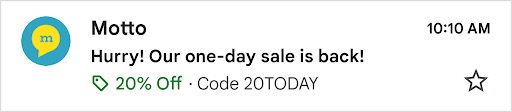
These annotations began as something marketers could not control. We were generally left to the good graces of our friend, Google. Then we gained some control, but it was rather inconsistent regarding when annotations would show up no matter how we coded things. But now, Gmail is swinging the doors open and letting any of us senders use annotations (aside from content that is deemed a “sensitive topic”) and hold majority control over what is shown.
And some will say: “Alex, this is just one email inbox, how impactful can it possibly be?” Well, with nearly one-quarter of the email market share dominated by Gmail (that is, if the client is noted as “Gmail” and does not include AppleMail users or the like), it’s pretty obvious this could be a helpful tactic to boost engagement.
But don’t just take my word for it, go ahead, check your own universe, I’d be surprised if your Gmail share were less than 30% of your list (and yeah, it’s honestly probably north of 50%).

And as told to me by an insider at Google, the percentage of those users who use the Promotions tab is higher than anything they’ve seen published by third parties online. With these features becoming more deeply ingrained in users’ everyday lives, staying on the cutting edge of these tactics will benefit almost any mass-send program – especially since, as of this writing, every controllable aspect is entirely free.
The 4 Types of Gmail Annotations You Can Use
Gmail launched four different annotations you can leverage:
- Product Carousels – Can display up to 10 images for a promotion. It can show the price, discount, description, image, and link to the correct (tracked) URL.
- Single Image Preview – Similar to the carousel but just one single image.
- Deal Annotation – Adds a promotional badge to your email in the inbox near the subject line. It can give a description, a discount code, and (in the final two days) show a daily countdown to expiration.
- Deal Card – These are visual summaries of the promotion that shows once the email is opened and are similar to the annotation described above. From my testing, it seems that when deal card code is used, it will also provide the annotation in the inbox.
Before You Start: The Caveats
While manual annotations give you the power, Google still has a few rules of engagement you need to keep in mind:
- Domain Whitelisting: You or your agency may need to reach out to Google to have your sending domain explicitly whitelisted.
- Consumer Inboxes Only: Annotations currently do not appear in Google Workspace (B2B) accounts.
- Promo Tab Exclusive: These features will not show up in the Primary or Social tabs.
- Device Rendering: Annotations may not fully appear for all users on all or some desktop environments and some mobile environments.
Taking Control: Manual Overrides vs. Automatic Extraction
These annotations started as a feature that would auto-extract information from emails with no way to control the annotation. That transitioned into a mixed approach where you could add code but it wouldn’t reliably control the annotation, maybe your sending domain wouldn’t qualify, or one of a plethora of other black-box reasons Google could put forward.
But now, Google is letting brands and agencies control the annotations in inbox! Yes, WE THE PEOPLE HAVE THE POWER NOW!

But really, Google has given users the ability to control the annotations. If you choose to put no additional code in the email, then Gmail may extract information, but if you add the code, the manual annotation will override any automatic extraction. So as long as you can code the information into the email correctly, you’ll be able to display product carousels, deal cards, annotations, or single images as much as you want.
How to Implement Annotations in Your Emails
I can dabble in some coding here and there. Heck, maybe I can even go a bit deeper if AI is able to help me, but I certainly don’t claim to be a developer. But Google does have some pretty good guides that can help walk through how to get the correct code into your email templates.
You basically have two options for inserting the schema into your emails: 1) JSON-LD or 2) Microdata (well, actually three options because Planit could do it for you by contacting us here).
For JSON-LD, this only works if you can inject it into your email’s header, which many email providers don’t allow you to access (or at least, they don’t make it easy). I’ve stuck with using microdata, which can be easily added to an email in the visual editor by adding a custom HTML block and inserting the necessary code.
Here’s an example of deal card microdata (yes, the hardest part really is just getting your data/time into ISO 8601 format):
<div itemscope itemtype="http://schema.org/DiscountOffer">
    <meta itemprop="description" content="Up to 25% off!"/>
    <meta itemprop="availabilityStarts" content="DATE-ISO 8601"/>
    <meta itemprop="availabilityEnds" content="DATE-ISO 8601"/>
    <meta itemprop="merchantHomepageUrl" content="LINK GOES HERE"/>
</div>
Then here is an example of what it’d look like fully filled out in an email service provider:
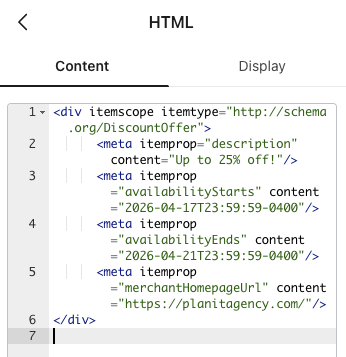
In this example, within the inbox, it’d:
- Show “Up to 25% off!” along with the subject line.
- Starting two days before expiration, it’d say “Expires in 2 days” and then “Expires tomorrow” and then “Expires today”
Within the email itself, it’d show a card above the email containing the following:
- Button that says “Visit site”
- “Up to 25% off!” within the card.
- Show the expiration date.
Some of you may be saying, “BUT WHAT ABOUT TRACKING?!”
Well, I’m happy to tell you that Google has indicated the links you input using schema will get fully tracked and you can rest assured your data won’t get more convoluted than it already may be.
Testing and Impact: Why You Should Be an Early Adopter
Naturally, Google is super excited about these new features and honestly, I am too! It’s a fun, eye-catching tactic that doesn’t add much time to a process but could provide a great impact.
Because this technology is so new, you won’t find a dozen case studies online breaking down the exact ROI just yet. But that’s actually your biggest advantage. You have a rare opportunity to be a first-mover (which I know sounds like code for “guinea pig,” but I promise the risk is practically zero and the upside is massive!). While your competitors are still fighting for attention with standard text, your brand can pioneer this highly visual inbox experience and stand out before everyone else figures it out. What’s more, even when your competitors catch up, you’ll already be optimizing lightyears ahead!
I want to know how it’d perform for you because what’s more fun than cooking up a testing plan and letting the results roll in? Seriously, though, you should reach out to me and let’s figure out how to start testing on your program now. Email me at [email protected].
Does injecting your email program with a reimagined strategy and cutting-edge testing sound exciting to you? Let’s create an entire strategy for you then! Go ahead, contact us here.