
In today’s competitive search landscape, visibility is everything. That’s where schema markup—also known as structured data—comes in. It helps search engines understand your content and unlocks powerful enhancements in the search results, like rich snippets, star ratings, FAQs, product details, and more.
This guide breaks down the basics and benefits of schema markup, and how to implement it step-by-step—whether you’re a marketer, business owner, or developer.
Updated for 2026: Search engines are evolving rapidly with AI Overviews and answer-first experiences. Structured data plays an even bigger role in helping your content get selected—not just indexed.
What Is Schema Markup and Why Does it Matter?
Schema markup (structured data) is code that helps search engines understand your content and display it as enhanced results like FAQs, reviews, and product details. While it’s not a direct ranking factor, it improves visibility, click-through rates, and your chances of being featured in rich results and AI-generated answers.
Schema markup is built using a shared vocabulary provided by Schema.org, a collaboration between Google, Bing, Yahoo, and Yandex. It defines hundreds of types and properties—covering everything from articles and products to events, reviews, and even recipes.
Most modern implementations use JSON-LD, a JavaScript-based format that is easy to insert into the or body of your HTML. Other formats like Microdata and RDFa are still valid but less common due to their complexity.
Key Structured Data SEO Benefits:
While schema markup isn’t a direct ranking factor, it plays a big role in how your pages appear in search results. Rich snippets powered by structured data often lead to higher click-through rates, improved user trust, and better visibility—especially in competitive verticals.
- Rich Snippets: Add extra information like star ratings, product availability, FAQs, and event dates right within your search listings.
- Improved CTR: Users are more likely to click listings that stand out visually.
- Enhanced Crawl Understanding: Search engines better understand your site architecture and how pages connect.
- Voice Search Optimization: Structured content is easier for AI assistants to parse, increasing your chances of being a voice search answer.
- Content Classification: Schema helps Google place your content into its Knowledge Graph and topical clusters.
How Schema Markup Impacts AI Search in 2026
In 2026, schema markup does more than enhance search listings—it helps AI systems understand, trust, and select your content. With the rise of AI-generated answers and Google’s AI Overviews, structured data increases the likelihood that your content is used as a source in synthesized responses.
Schema doesn’t give you a direct ranking boost, but it improves how your pages are presented in search. Rich results stand out more, offer better context to users, and tend to earn more clicks. Schema can improve visibility and click-through rates, which can help your content attract more traffic over time. ~ Neil Patel
AI systems prioritize:
- Clearly structured content
- Defined entities (products, organizations, authors)
- Consistent, machine-readable information
Schema markup supports all three, making it a foundational element of Generative Engine Optimization (GEO).
| Feature | Traditional SEO | Schema Markup |
| Focus | Keywords & content | Structured data |
| Goal | Rank in search | Enhance visibility |
| Output | Blue links | Rich results, AI answers |
| Impact | Eligibility | Selection & presentation |
Types of Schema Markup Every Business Should Use
While there are hundreds of specific schema types, here are the most impactful for businesses across industries:
1. Local Business or Organization Schema
Add this to your homepage or location pages to give search engines key business details. This includes your business name, address, phone number (NAP), hours of operation, geo-coordinates, and links to your social profiles.
Example use: A restaurant chain with multiple locations can implement a unique Local Business schema for each store to help each one rank individually in local searches.

2. Product Schema
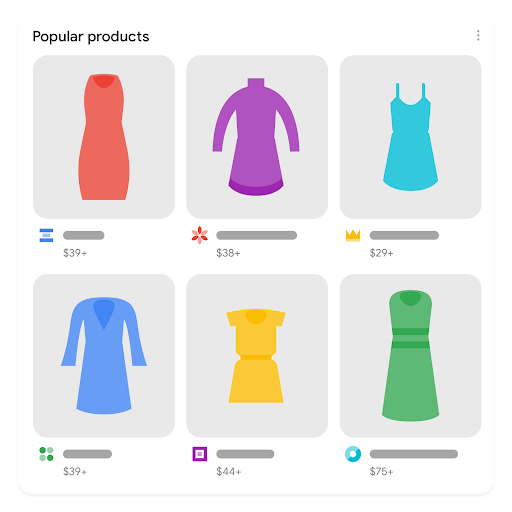
Ideal for e-commerce, this product-rich results let Google display product names, prices, availability, and reviews. It’s what powers listings with star ratings and pricing info in search results.
Example use: A CBD retailer uses Product schema to highlight different tinctures with customer reviews, price, and stock status—driving more qualified traffic to product pages.
3. Blog Posting or Article Schema
Use Blog Posting or Article schema to enhance blog posts, news updates, or editorial content. This structured data helps Google display key information like the headline, author, publish date, and featured image directly in search results, making your content more engaging and trustworthy. It also helps Google understand the content type, which can improve indexing and inclusion in features like Google News and Top Stories.
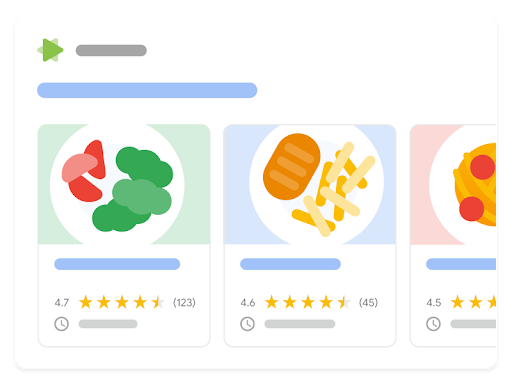
For food bloggers or any site that publishes recipes, Recipe schema is a must. It allows search engines to display rich information like cooking time, ingredients, nutrition facts, ratings, and even step-by-step instructions—often with images or video in the search results. Recipe schema not only improves your chances of earning rich results but also helps your content appear in Google Recipe Carousels, which can drive substantial traffic from users looking for cooking inspiration.
4. FAQ Schema
This format displays a list of questions and answers directly under your organic search listing. It increases page real estate and provides quick answers to users.
Example use: Many companies use FAQ Page schema on product pages to answer common objections and increase conversions from organic traffic.

5. Event Schema
Promoting a webinar, in-store event, or grand opening? Event schema shows date, time, and location right in the search result.

6. Review Snippets and Aggregate Rating Schema
Encourages trust by highlighting customer reviews and average ratings for a product or service. Be sure your reviews are visible on the page and compliant with Google’s guidelines.

7. Breadcrumb Schema
Breadcrumbs help both users and search engines understand where a page fits into your overall site architecture. This schema makes breadcrumb navigation appear in search results.

How to Add Schema Markup to Your Website (Step-by-Step)
There are different ways to use schema markup. The best method is to use JSON-LD markup. It is a simple and flexible format that Google supports. You can write this manually or generate it using online tools, then place the code in the or body of your HTML. This method offers the most control and is ideal for developers or marketers with basic coding access.
If your website runs on a CMS like WordPress, you can use SEO plugins such as Yoast, Rank Math, or Schema Pro to streamline implementation. These tools often auto-generate schema based on your content type and settings, which is helpful for smaller teams or less technical users. For marketers who don’t have direct access to the codebase, Google Tag Manager offers a no-code workaround—allowing you to inject schema markup onto specific pages using custom HTML tags.
Step-by-Step Implementation Guide
Start by identifying the type of content you want to enhance—whether it’s a product, blog post, business location, FAQ section, or event page. Once you’ve chosen the schema type that fits, use tools like Google’s Structured Data Markup Helper, ChatGPT, or RankRanger to create your JSON-LD code. After generating the markup, place it directly on the appropriate page using your chosen method (manual, plugin, or Tag Manager).
Before publishing, always validate your schema using Google’s Rich Results Test or Schema.org’s validator to ensure it’s error-free and eligible for rich results. Once live, monitor performance in Google Search Console under the “Enhancements” tab. This section will alert you to errors, show how many pages are eligible for rich results, and give you insight into how your structured data is performing over time.
Common Schema Mistakes to Avoid
- Adding schema to irrelevant or thin content
- Leaving out key fields like price, author, or location
- Duplicating schema types on unrelated pages
- Using conflicting or outdated schema formats
- Assuming plugins handle everything—always verify manually
Tracking Performance and SEO Impact
It’s essential to monitor how structured data influences visibility, engagement, and click behavior in organic search once you implement it on your site. Google provides several tools to help you track the presence and effectiveness of schema-enhanced content.
After implementing schema, track:
- Rich result appearance in Search Console
- Increased impressions or CTR on enhanced listings
- Indexed content coverage (especially for FAQs and Products)
- Improved user engagement from clearer SERP results
Schema doesn’t guarantee rich results, but Google is more likely to reward clean, relevant structured data. Over time, well-structured pages can benefit from better content discoverability, particularly when combined with high-quality writing and optimized metadata. Regularly auditing your schema performance ensures your markup remains aligned with search trends and Google’s evolving guidelines.
Bonus: Schema for Multi-Location or Enterprise Sites
If your business has multiple locations (e.g., retail stores, clinics, dispensaries, or franchises), each one should have its own dedicated page and unique Local Business schema markup. This helps Google treat each location as a separate entity in local search results.
Make sure to include accurate NAP (Name, Address, Phone number) information for each location, along with:
- name: The location-specific business name
- address: Full structured address using PostalAddress
- telephone: Local phone number
- opening hours: Days and hours of operation
- geo: Optional but helpful (latitude/longitude coordinates)
- url: The direct URL to the location’s page on your site
By applying Local Business schema to each location-specific web page, you’re giving search engines precise, structured signals that support better local SEO visibility, Google Business Profile consistency, and map pack rankings.
Structured data helps you do more with the content you already have. By adding schema markup, you can unlock better search visibility, richer results, and improved clarity for both users and search engines.
Frequently Asked Questions About Schema Markup
What is schema markup in simple terms?
Schema markup is code that helps search engines understand your content so they can display it with enhanced features like star ratings, FAQs, and product details.
Does schema markup improve rankings?
Schema markup is not a direct ranking factor, but it improves how your listings appear in search results, which can increase click-through rates and visibility.
What is the best format for schema markup?
JSON-LD is the recommended format because it’s easy to implement and supported by Google.
Want to get started fast? Download our Schema Implementation Checklist to guide your next optimization.
✅ Schema Implementation Checklist (Downloadable Format)
Use this list to guide your internal team or clients through a proper schema setup.
🔍 Planning
- Identify business goals (visibility, CTR, product listings, local SEO)
- Map which pages need schema (products, FAQs, blogs, locations)
💡 Choose Schema Types
- LocalBusiness / Organization
- Product
- Article / BlogPosting
- FAQ
- Event
- Review / AggregateRating
- Breadcrumb
🛠️ Implementation
- Generate JSON-LD code with a reliable tool
- Insert code manually, via plugin, or with Google Tag Manager
- Validate code with Google’s Rich Results Test
- Ensure code reflects actual content on the page
📊 Monitoring & Maintenance
- Check for schema errors in Google Search Console
- Monitor rich result performance (CTR, impressions)
- Update schema if content changes
- Audit structured data quarterly for accuracy
Ready to take your SEO to the next level with structured data? Explore our SEO expertise or get in touch with our digital marketing agency to talk about your goals.